Dev License: This installation of WHMCS is running under a Development License and is not authorized to be used for production use. Please report any cases of abuse to abuse@whmcs.com

How to connect to windows server using remote desktop connection?

How to connect to windows server using remote desktop connection?

Step 1: Open Start Menu and search Remote Desktop Connection

Remote Desktop Connection

Step2:

Enter desired Computers IP to connect
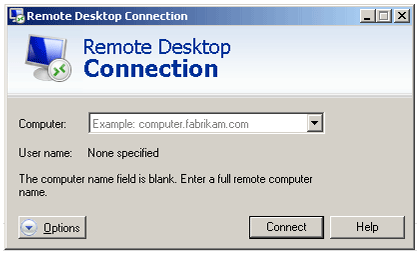
 Remote Desktop Connection

 Step 3:

Once connected it will ask for authentication, Enter the correct user name and password to validate.
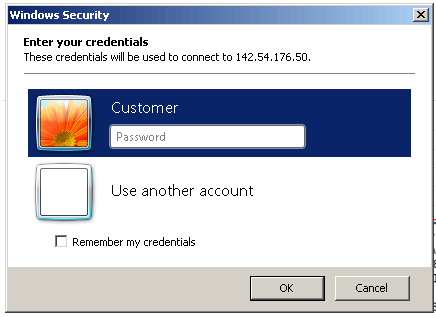
 Remote Desktop Connection

Step 4:

If its asking for certificate verification. Just click yes to proceed further.
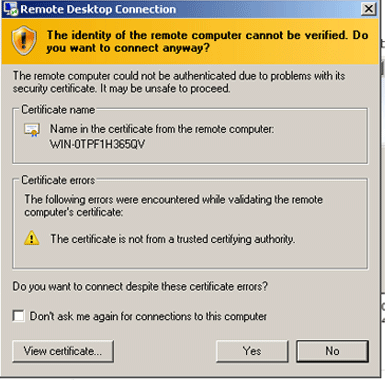
 Remote Desktop Connection


This will take you to your servers Desktop Area.

هل كانت المقالة مفيدة ؟

مقالات مشابهة

Find spam script location with Exim

Sometimes you can have a "tell a friend" feature on your website, or other type of email...

How to change the primary IP addres of a WHM/cPanel server

This is for CentOS/RHEL based servers. Steps in WHM: Log into WHM and go to Basic cPanel...

How to change file/folder permissions in linux cent os

Using SSH (Putty) > Login as root enter the following code to Change all permissions for...

clamAV installed, but not working on the command line and appears to not be installed

On 11.40+ You may try to install ClamAV and then see it have problems when trying to run on...

Exim Remove All messages From the Mail Queue

Question: I'm using Exim mail server under CentOS Linux. How do I remove all messages from the...

Powered by WHMCompleteSolution