Dev License: This installation of WHMCS is running under a Development License and is not authorized to be used for production use. Please report any cases of abuse to abuse@whmcs.com

How to connect to windows server using remote desktop connection?

How to connect to windows server using remote desktop connection?

Step 1: Open Start Menu and search Remote Desktop Connection

Remote Desktop Connection

Step2:

Enter desired Computers IP to connect
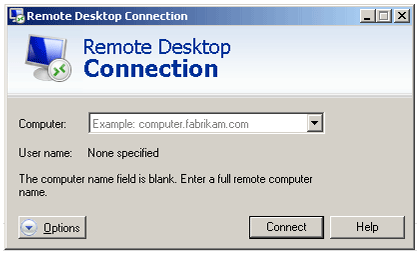
 Remote Desktop Connection

 Step 3:

Once connected it will ask for authentication, Enter the correct user name and password to validate.
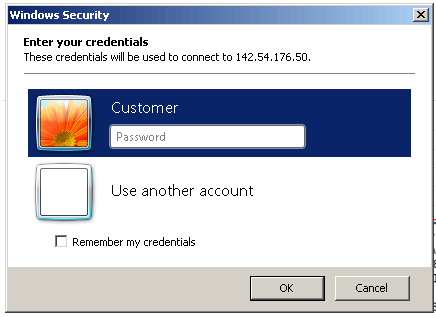
 Remote Desktop Connection

Step 4:

If its asking for certificate verification. Just click yes to proceed further.
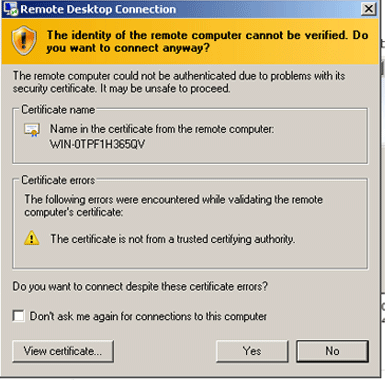
 Remote Desktop Connection


This will take you to your servers Desktop Area.

Var dette svaret til hjelp?

Relaterte artikler

Find spam script location with Exim

Sometimes you can have a "tell a friend" feature on your website, or other type of email...

How to change the primary IP addres of a WHM/cPanel server

This is for CentOS/RHEL based servers. Steps in WHM: Log into WHM and go to Basic cPanel...

How to change file/folder permissions in linux cent os

Using SSH (Putty) > Login as root enter the following code to Change all permissions for...

clamAV installed, but not working on the command line and appears to not be installed

On 11.40+ You may try to install ClamAV and then see it have problems when trying to run on...

Exim Remove All messages From the Mail Queue

Question: I'm using Exim mail server under CentOS Linux. How do I remove all messages from the...

Powered by WHMCompleteSolution